
BMW Window Sticker Lookup by VIN – Get Original Factory Sticker
Enter a BMW VIN to get the original window sticker and see the exact MSRP, factory options, fuel economy, and safety details as the vehicle left the factory. Verify pricing and avoid surprises before you buy, sell, or list any BMW.
Recently Search BMW Window Sticker by VIN
Latest vehicle checks for BMW
What is a BMW Window Sticker?
A BMW window sticker, also known as a BMW Monroney label, is the factory document that shows how a BMW was originally built and priced when it left the assembly plant. It lists the base MSRP, factory-installed options and packages, destination charges, fuel economy information, and safety ratings when available.
Because the sticker is generated directly from the VIN, it reflects the vehicle's exact factory configuration—not a generic list of what the model could have had. A BMW window sticker lookup is the most reliable way to confirm original equipment, pricing, and specifications without relying on seller claims or online listings.
The Monroney Label Explained
The Monroney label is named after Senator Almer "Mike" Monroney, who sponsored the Automobile Information Disclosure Act of 1958. This law requires every new vehicle to display a window sticker showing the manufacturer's suggested retail price and factory-installed equipment. For BMW owners today, that same data is still available by VIN—even if the original paper sticker was lost years ago.
Why Factory Data Matters for BMWs
BMW offers dozens of options and packages across its model range. Two identical-looking BMWs can have vastly different values based on factory equipment. A 3 Series with the M Sport Package and Premium Package is worth thousands more than a base model and the window sticker proves exactly what was installed at the factory.
Why Is It Important to Check a BMW Window Sticker?
Checking the original factory sticker ensures everyone is working from the same verified information. A BMW window sticker by VIN shows how the vehicle was built and priced at the factory, removing assumptions and guesswork from every transaction.
Buyers
Confirm the Exact Factory Build
The sticker shows trim level, factory packages, wheel and tire setups, and interior configurations, so you know precisely what the BMW includes.Verify Original Pricing
You can see the base MSRP, individual option prices, destination charge, and total original price to judge value accurately. This makes it easier to compare BMW sticker price by VIN across similar vehicles.Catch Listing Errors Early
The factory sticker helps you quickly spot incorrect or overstated features in online listings or seller descriptions.Understand Ownership Costs
Fuel economy or electric efficiency figures are listed when available, helping you estimate day-to-day running costs.Review Safety Ratings
Government safety ratings appear on the sticker when available, clearly shown or marked as not rated when testing was not performed.
Sellers
Build Buyer Confidence
Sharing the original BMW window sticker shows transparency and helps buyers trust the accuracy of your listing details.Present a Professional Listing
A clean BMW window sticker PDF adds credibility to your listing and attracts more serious, qualified inquiries.List Factory Options Accurately
The sticker allows you to copy factory-installed options, colors, and packages directly, reducing mistakes and confusion.Support Your Asking Price
Showing the original MSRP and paid-for options helps explain your pricing and strengthens your position during negotiations.Separate Factory Features From Add-Ons
The sticker clearly distinguishes factory equipment from dealer-installed or aftermarket additions, so buyers know exactly what is original.
Dealers
Reduce Errors on Used Car Listings
Using a BMW VIN window sticker helps prevent incorrect option claims on used BMW listings, reducing disputes, returns, and buyer complaints.Standardize Vehicle Presentation
Accurate factory options and MSRP allow sales teams to present vehicles consistently across all inventory.Reduce Negotiation Friction
When buyers and staff reference the same VIN-based data, discussions stay focused and factual, helping deals move forward faster.Streamline Appraisals and F&I
Using a BMW window sticker by VIN lookup ensures appraisals and finance processes rely on the same verified specifications.Present Safety Information Clearly
When safety ratings are shown on the sticker, they can be shared confidently with buyers during the sales process.
What Information Does a BMW Window Sticker Contain?
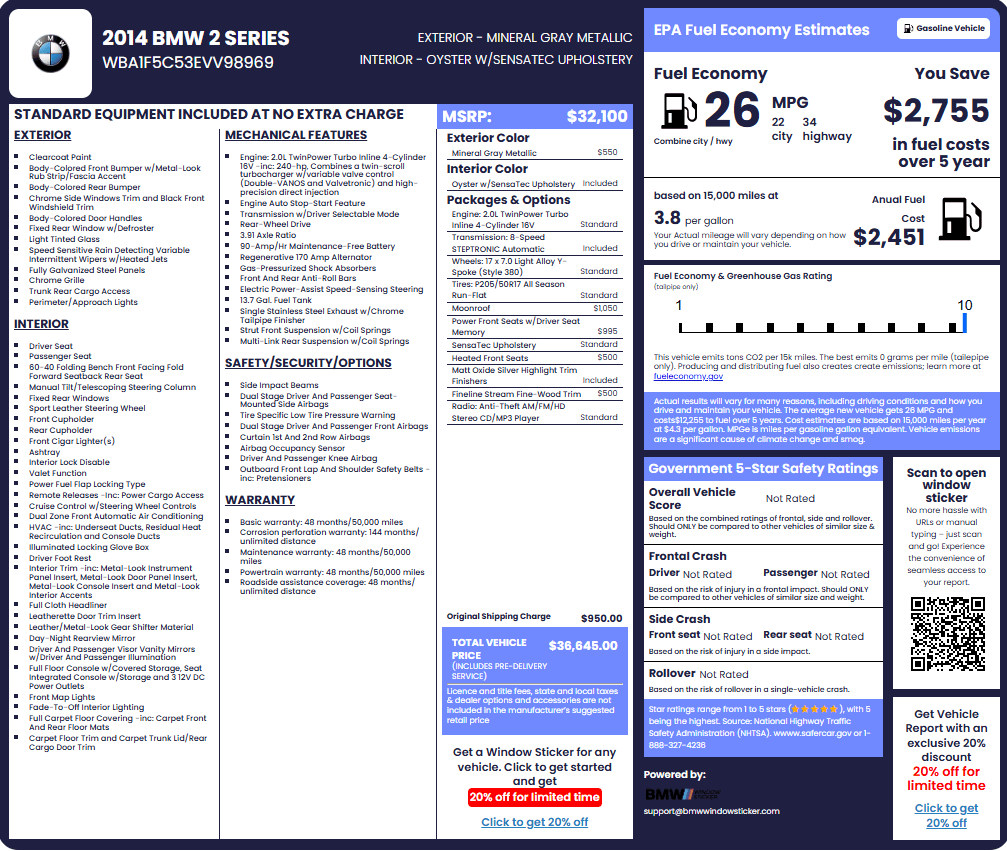
A BMW window sticker shows how the vehicle was configured and priced when it left the factory. Every detail is tied to the VIN, so the information reflects the exact BMW you are reviewing.
Here’s what it includes:
Vehicle Identification and Description
This section confirms the identity of the BMW and how it was originally described.
Model Year, Series, and Trim
Shows the model year, BMW model (e.g., 330i, M340i, X5 xDrive40i), body style, series, and trim as listed when the vehicle was sold new. This confirms you're looking at the correct vehicle before reviewing any other details.
VIN and Manufacturer Details
Lists the full 17-character VIN and confirms the vehicle as a factory-built BMW tied to official production records. Always verify that the VIN on the sticker matches the VIN on the dashboard and door jamb.
MSRP and Pricing Breakdown
These details explain how the BMW was priced from the factory.
Base MSRP
Shows the original base MSRP set by BMW before any options or fees were added. This is the starting point for understanding how the vehicle was priced when new.
Optional Equipment and Packages
Lists every factory-installed option and package along with individual prices. The Premium Package, M Sport Package, Driving Assistance Package—all are shown with their original costs.
Destination and Shipping Charges
Displays the destination or shipping charge added to every new BMW. This fee covers transport from the factory (in Germany or South Carolina) to the dealership.
Total Vehicle Price
Displays the full original sticker price, combining base MSRP, all options, and destination charges. This is the number that appeared on the dealership window when the car was new.
Mechanical and Powertrain Features
This section explains how the BMW drives and performs.
Engine and Powertrain Configuration
Shows the engine type and powertrain installed at the factory.
Drivetrain and Transmission
Confirms rear-wheel drive or xDrive and the transmission included in the original build.
Chassis, Suspension, and Braking
Includes suspension setup and braking information when shown on the sticker.
Exterior Features
These details describe the BMW’s exterior equipment.
Exterior Features
Lists factory-installed exterior equipment such as lighting, wheels, mirrors, and trim elements.
Appearance and Styling Packages
Identifies appearance-focused packages that affect styling rather than performance.
Exterior Equipment Notes
Highlights exterior-related equipment differences between trims when applicable.
Interior Features and Cabin Details
This section confirms the interior configuration as built.
Interior Features and Equipment
Lists factory-installed interior features such as seating options, infotainment systems, and comfort features.
Seating and Cabin Configuration
Confirms seating layout, seat functions, and upholstery type installed when new.
Interior Technology and Controls
Covers displays, iDrive systems, and cabin controls included from the factory.
Interior and Exterior Colors
These details confirm the original color configuration.
Exterior Paint Color
Shows the factory paint color applied when the BMW was built.
Interior Color and Trim
Lists the original interior color and trim materials selected at the factory.
Safety and Security Information
These details support safety evaluation and buyer confidence.
Safety and Security Features
Lists factory-installed safety and security systems included in the original configuration.
NHTSA Safety Ratings
Displays official crash-test ratings when available or indicates when a BMW was not rated.
Safety Disclosure Notes
Includes safety-related disclosures shown on the original sticker.
Warranty Information
This section shows the factory coverage that applied when the BMW was new.
Factory Warranty Coverage
Lists the original warranty coverage provided by BMW at the time of first sale.
Warranty Terms and Duration
Shows coverage periods and mileage limits as originally offered.
Fuel Economy and Environmental Ratings
This section helps estimate operating costs and emissions impact.
Fuel Economy Ratings
Shows official EPA city and highway fuel economy figures or electric efficiency ratings when applicable.
Greenhouse Gas Rating
Displays the greenhouse gas rating associated with the vehicle’s fuel economy label.
Emissions and Efficiency Notes
Includes environmental and emissions disclosures shown on the original sticker.
How To Read A BMW VIN
Every sticker is anchored by a 17-digit VIN.
BMW VINs follow global rules:
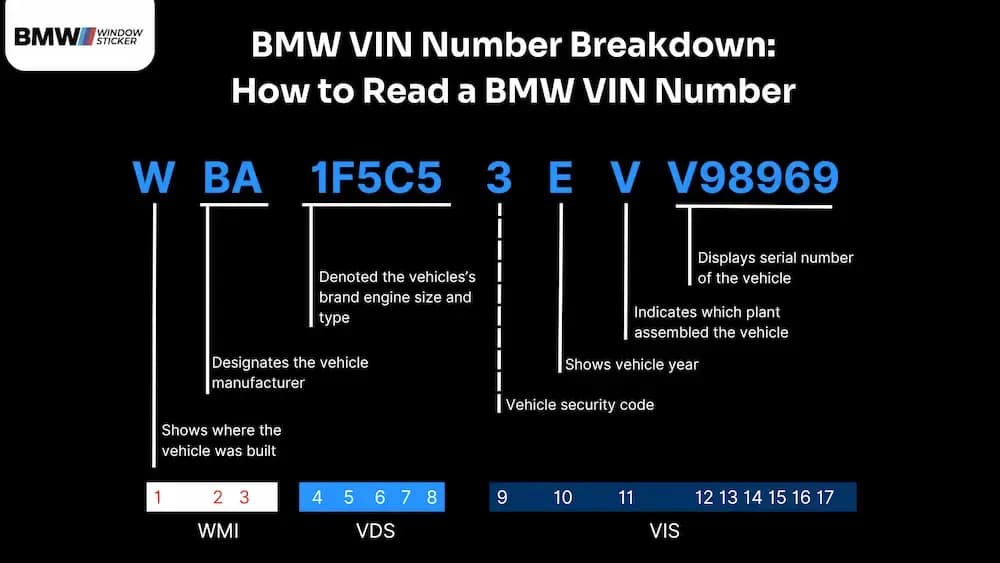
- The World Manufacturer Identifier (WMI) (characters 1–3): identifies the manufacturer and country of origin.
- The Vehicle Descriptor Section (VDS) (characters 4–8): describes the model, body, and engine.
- The Vehicle Identifier Section (VIS) (characters 10–17): adds model year, assembly plant, and a unique serial number.
1st Character
This character explains the country of origin. For a BMW, the first character of the VIN is almost always a "W," indicating that the vehicle was manufactured in Germany, and the U.S.-assembled X5 often uses a U.S. first digit.
Discover another of the 1st characters below:
| 1, 4, or 5 | 2 | 3 | J | K | S | W | Z |
|---|---|---|---|---|---|---|---|
| USA | Canada | Mexico | Japan | Korea | England | Germany | Italy |
2nd Character
Combined with the first, this forms the World Manufacturer Identifier (WMI).
BMW WMIs include codes assigned via SAE on NHTSA’s behalf for U.S. production and codes for BMW AG in Germany.
3rd Character
Together with positions 1–3, the 3rd digit completes the WMI and can indicate vehicle category or division per the manufacturer’s filing.
In practice, this helps separate passenger cars from other types and aligns the VIN with BMW’s certification data filed with NHTSA.
Typical BMW codes are:
*Examples are illustrative, not exhaustive. Exact assignment can shift by generation and market.
4th Characters
This narrows you into the series and body style lane. It’s where BMW differentiates sedans vs. coupes vs. SAVs/SACs (X and iX lines), and sometimes long-wheelbase or special body variants.
In practice, it points you toward “3 Series Sedan vs. 4 Series Coupe vs. X5,” etc.
5th Characters
BMW uses the VDS to encode engine attributes (fuel type, displacement group, cylinder count) specific to its internal tables filed with NHTSA.
Example use: distinguish a 330i four-cylinder from an M340i six-cylinder before you even open the hood. This matters because it helps confirm the exact safety spec your car left the factory with, useful for parts compatibility and verifying equipment on imports or cross-market cars.
6th Characters
This digit often captures restraint systems (front/side/curtain airbags, seat-belt types) within the manufacturer’s scheme. This matters because it explains safety hardware baked into the car’s original configuration and supports parts lookup and body-shop ordering after a repair.
7-8th Characters
On BMWs, VIN positions 7–8 finish out the VDS (Vehicle Descriptor Section), which also pinpoints the specific model/generation code inside BMW’s filing, think of them as the short code for “which exact car is this?” Helpful when two cars look the same but sit on different platforms or generations.
9th Character
A math guard that validates the whole VIN. If it doesn’t compute, there’s a typo or tampering. BMW/NHTSA flags this as the check digit position.
10th Character
This character shows the BMW’s model year. Each letter or number stands for a different year. For example, “T” might mean 2026, depending on context. You can match it using a VIN year table. Below are common codes for recent years:
| A=2010 | B=2011 | C=2012 | D=2013 | E=2014 |
|---|---|---|---|---|
| F=2015 | G=2016 | H=2017 | J=2018 | K=2019 |
| L=2020 | M=2021 | N=2022 | P=2023 | R=2024 |
| S=2025 | T=2026 | V=2027 | W=2028 | X=2029 |
11th Character
The 11th VIN character points to the assembly plant (e.g., Dingolfing, Spartanburg, etc.). Nice for spotting where your car was born.
12th to 17th Characters
The last six are the production sequence. They don’t carry specs, but it uniquely identify your BMW among thousands of similar builds and link service, recall, and registration records back to your car.
How to Get Your BMW Window Sticker by VIN
If you have the VIN, you can easily pull the BMW window sticker and see the original pricing, options, and specifications exactly as the vehicle left the factory.
Step 1: Enter the VIN
Enter the 17-character VIN. Don’t have it handy? You can also begin with a license plate or your BMW’s year, make, and model.
Step 2: Click “Get Window Sticker.”
Hit the button. We’ll fetch your BMW’s build details and show a quick preview.
Step 3: View and Download Window Sticker
Check out, and instantly download or print your BMW window sticker.
That’s it! three simple steps. In a few moments, you’ll see the official features, options, MSRP, and more for your BMW.
Other routes:
- BMW dealership: Some dealers can reprint a label or confirm build data from factory systems. The timing varies, and priority goes to current sales/service customers.
- BMW (manufacturer) support: You can request assistance via official channels; response times differ.
- Online owner forums: Great for learning and examples, but not VIN-exact. Always verify against official data.
Where Can You Find a VIN on a BMW Vehicle?
A VIN is a 17-character code that identifies your BMW. Some older models built before 1981 may use shorter formats.
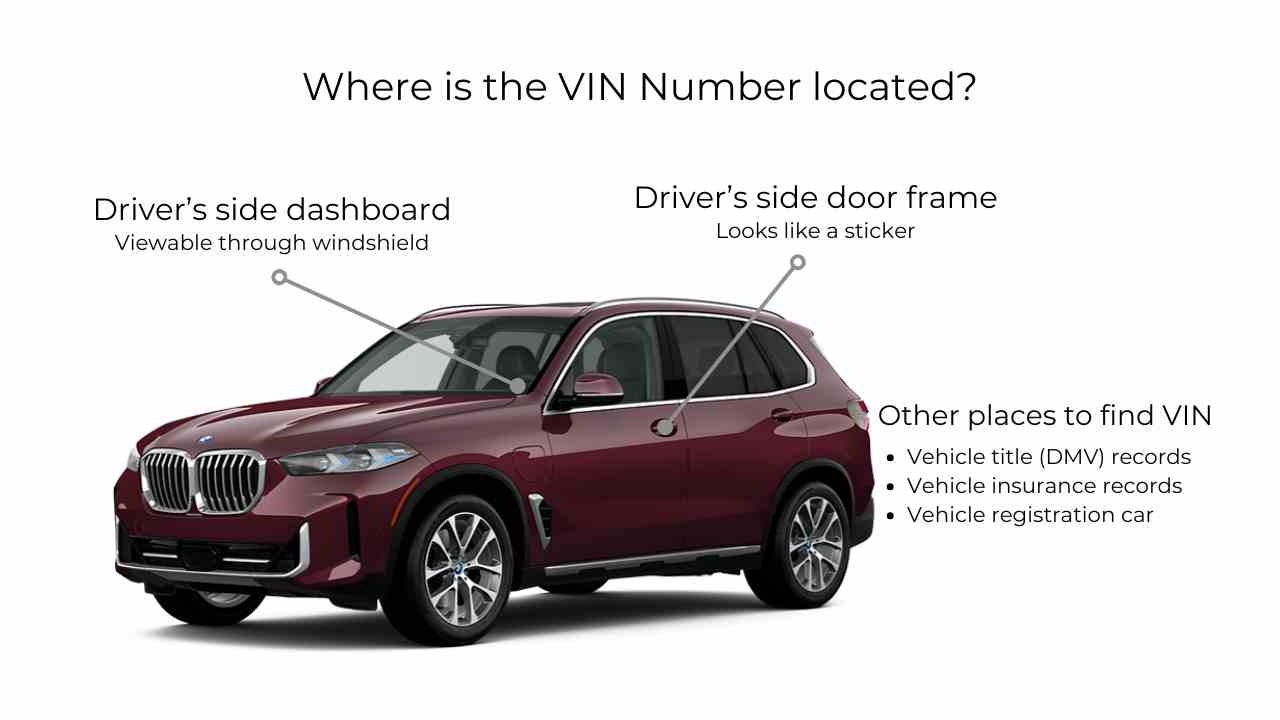
You can spot it in a few easy places, including:
Dashboard (Windshield Corner)
Look through the lower corner of the windshield on the driver’s side.
Driver-Door Jamb
Check the certification label on the driver-side door frame.
Engine Compartment
Many BMWs have the VIN stamped or engraved in the engine bay.
iDrive or Infotainment System
The VIN may appear in the vehicle information or status menu.
My BMW App
The VIN is listed in your vehicle details once the car is added.
Vehicle Documents
You’ll find the VIN on registration, insurance, and service paperwork.
On the Vehicle or Title (Pre-1981 BMWs)
Earlier BMWs may use shorter VIN formats listed on the title.
Why Choose Us to Get Your BMW Window Sticker?
There are a lot of ways to look up BMW information online. What matters is whether the details match the car. This tool focuses on factory accuracy, not guesses or scraped listings.
Here’s why we stand out:
Covers All BMW Models
From the 1 Series to the 7 Series, M cars, X and i models, and even many classics. If the VIN is valid, we’ll try to decode it. Old and new!
100% Accurate BMW Data
We tie directly to VIN-level build records, such as options, colors, packages, and MSRP. So you get day-one spec, not forum folklore.
Fast Results in Seconds
Enter the VIN, tap the button, and view the sticker. No waiting around. Works while you browse listings or stand by the car.
Useful for Buyers and Sellers
Buyers verify equipment; sellers prove authenticity and set the right price. Fewer questions, quicker decisions.
Clear Layout
Readable sections for MSRP, options, colors, fuel economy, and safety notes. Nice on mobile, printable for test drives. No clutter, no confusion!
Easy Checkout Process
Clear steps, secure payment, instant PDF. No hidden hoops. Download the PDF right after checkout.
Get Window Stickers for Popular BMW Models
Our BMW window sticker lookup tool supports nearly every BMW model. You can get the BMW x5 window sticker and get it for M models, electric models, classics, and more. Some models we cover are:
| 1 Series | 6 Series | X3 | Z4 |
| 2 Series | 7 Series | X4 | i3 |
| 3 Series | 8 Series | X5 | i4 |
| 4 Series | X1 | X6 | i7 |
| 5 Series | X2 | X7 | iX |
← Scroll horizontally to see more →
Get More Than BMW Window Stickers With These Tools
See the factory build, then go deeper. These BMW-focused checks help you price fairly, verify specs, and avoid guesswork.
Get a quick read of your VIN. Our decoder shows the detailed insights into any vehicle’s specifications, features, production details, and even its past.
Look up official fuel-economy values linked to your build, so you can compare trims fairly. Great for budgeting and daily driving expectations.
Find the factory options and packages your BMW left the plant with (e.g., audio upgrades, driver-assist suites, wheels, appearance packs, and more). Perfect for listings, appraisals, and parts planning when you need the exact build, not guesses.
See the factory warranty status tied to your VIN. Helpful when you’re pricing a used BMW or planning service costs. We point you to what’s active, what’s expired, and what to ask a dealer to confirm.
View the original pricing picture: base MSRP, option pricing, and the destination charge associated with your VIN. This helps you see how a car was positioned when new and why two similar cars may be priced differently today.
The buildsheet shows production codes and configuration details tied to your VIN, useful for double-checking equipment and ordering precise replacement parts. Clear, structured, and easy to save for your records.
Decode Your BMW Window Sticker Now
Ready to get your BMW window sticker? With it, you can see the original MSRP, factory options, colors, and specifications tied to your VIN. Get the window sticker now and review the details in one clear place.
FAQ about BMW Window Stickers
Yes, you can pull up a window sticker using a BMW window sticker lookup by VIN . Enter the 17-character VIN to generate a factory-style sticker that mirrors the original Monroney label, including MSRP, options, colors, fuel economy, safety ratings, and more.
A BMW window sticker may be unavailable because paper copies are often lost after the first sale, and some digital archives do not retain older records. In these cases, a BMW window sticker from the VIN can be recreated using factory build data.
Yes, a proper BMW window sticker shows the full VIN, allowing you to match the document directly to the vehicle. A valid BMW VIN sticker should always include the complete VIN.
Yes, you can get the MSRP from the BMW window sticker. It shows the base price plus option pricing and destination charges, which is why totals are often higher than the base figure when checking bmw usa window sticker data.
For BMW vehicles sold in the U.S., the dealer window sticker is officially known as the Monroney label. When the original paper label is no longer available, it can be easily gotten with a BMW window sticker lookup by VIN.
A window sticker is not legally required for used BMWs, but you can still generate one using a BMW VIN lookup. This produces a factory-style sticker that reflects how the vehicle was originally built and priced.
Yes, police may check inspection stickers where they are required by law. Officers can verify that the sticker is present, current, and properly displayed.